

A Microsoft 365 tenant-to-tenant migration moves users, mailboxes, OneDrive files, SharePoint sites and Teams from one Microsoft 365 tenant to another, usually after an acquisition, a divestiture or a rebrand. Krish Services Group plans and runs the whole move, from identity mapping to the domain cutover, so your people keep working. Whether you are merging, splitting or restructuring Microsoft 365 tenants, our team, backed by our status as a Microsoft Solutions Partner, handles every detail. From security protocols to application compatibility, we ensure that your migration is not just a shift but an opportunity to enhance your cloud environment’s performance, security, and scalability.


We are SOC 2 Type 2 attested and ISO 27001 certified. We move holds, retention and sensitivity labels with a plan, because Microsoft's tools block mailboxes on hold and drop label protection on migrated SharePoint files.
We run a pilot first, move users in phased batches and validate every batch for access, mail flow and file counts before the next one starts.
Merge two tenants, split one, or move a business unit out of a shared Active Directory forest. We pick Microsoft's native tools or a third-party tool to fit your data, not one tool for every job.
One team covers discovery, identity mapping, coexistence, the domain cutover, user communication and support after go-live.
We size licence needs before you buy, clean out inactive accounts and stale data before the copy, and plan the overlap period so you do not pay for two tenants longer than needed.
Microsoft names four common reasons for a tenant-to-tenant migration: a merger or acquisition, a divestiture or spin-off, consolidating tenants left over from past deals, and an internal reorganization. These are the situations we see most:
During mergers or acquisitions, consolidating cloud environments into a single tenant is crucial for unifying operations, streamlining identity management, and reducing costs. A tenant-to-tenant migration ensures that both organizations can integrate their IT infrastructures effectively under one umbrella.
When a business unit is sold or spun off, its users, mailboxes and files must leave the parent tenant, often by a date set in the sale agreement. We separate the unit cleanly, including its identities in Active Directory, so it can run on its own tenant from day one.
A new company name often means a new tenant and a new email domain. We move users and data, keep mail flowing to the old addresses during the change, and switch the domain in a planned window.
Meeting industry-specific regulations, such as GDPR, HIPAA, or other compliance standards, may require adjustments to your cloud environment. Tenant-to-tenant migration helps align your cloud infrastructure with these regulatory requirements, ensuring that sensitive data is managed securely and compliantly.
As your business grows and evolves, so do your cloud computing needs. Tenant-to-tenant migration offers a valuable opportunity to re-architect your cloud environment for enhanced performance, cost-efficiency, and scalability, especially if your current setup is outdated or no longer meets your operational demands.
When a service contract is nearing its end, or a vendor is phasing out support for certain services, migrating to a new tenant can be a strategic decision. This migration ensures that your cloud environment remains supported and sustainable.
If your current tenant setup has security vulnerabilities or lacks the latest security features, migrating to a new tenant allows you to implement advanced security protocols. This migration enhances the protection of your data and applications, ensuring your cloud environment is secure.
Microsoft has a separate native tool for each workload. Here is what each one moves and leaves behind, from Microsoft’s own documentation.
| Workload | Native Microsoft tool | Licence needed | Does not move, or needs work | Plan for |
|---|---|---|---|---|
| Exchange Online mailboxes | Cross-tenant mailbox migration | Cross Tenant User Data Migration, one-time fee per user | Mailboxes on any hold. Mail signatures. Teams meeting links (meetings must be re-created). Teams chat folder content. | Release and re-apply holds. Tell users to re-create signatures and re-send Teams meeting invites. |
| OneDrive | Cross-tenant OneDrive migration | Same per-user licence | A one-way move with no delta passes. OneDrives on hold. Accounts over 5 TB or 1 million items. Paths over 400 characters. | Schedule a short freeze per batch. Fix long paths before the move. |
| SharePoint sites | Cross-tenant SharePoint migration | Cross-Tenant Shared Data Migration, per 100 GB moved (Enterprise Agreement customers only) | Teams channels and structure. 2010 and 2013 workflows, apps, Power Apps and Power Automate flows. Protection from sensitivity labels. | Rebuild flows and apps in the target. Remove and re-apply labels. |
| Teams chats and meetings | Migration Orchestrator | Same per-user licence | Teams and channels (shared data stays in the source). | Re-create teams and channels with a tool or by hand. |
| Users and identities | None: tools move content, not identities | n/a | Accounts, groups and licences must be created in the target first. | Build an identity map before the first batch. |
Two more Microsoft rules matter at scale. The OneDrive and SharePoint moves are “one and done”: content is moved, not copied, and a redirect is left behind. And the native OneDrive tool is not supported for GCC, GCC High or DoD tenants, so government contractors need another route.
Every tenant-to-tenant migration we run follows seven steps. The order matters: identities must exist in the target before any mail, files or Teams data can land there.
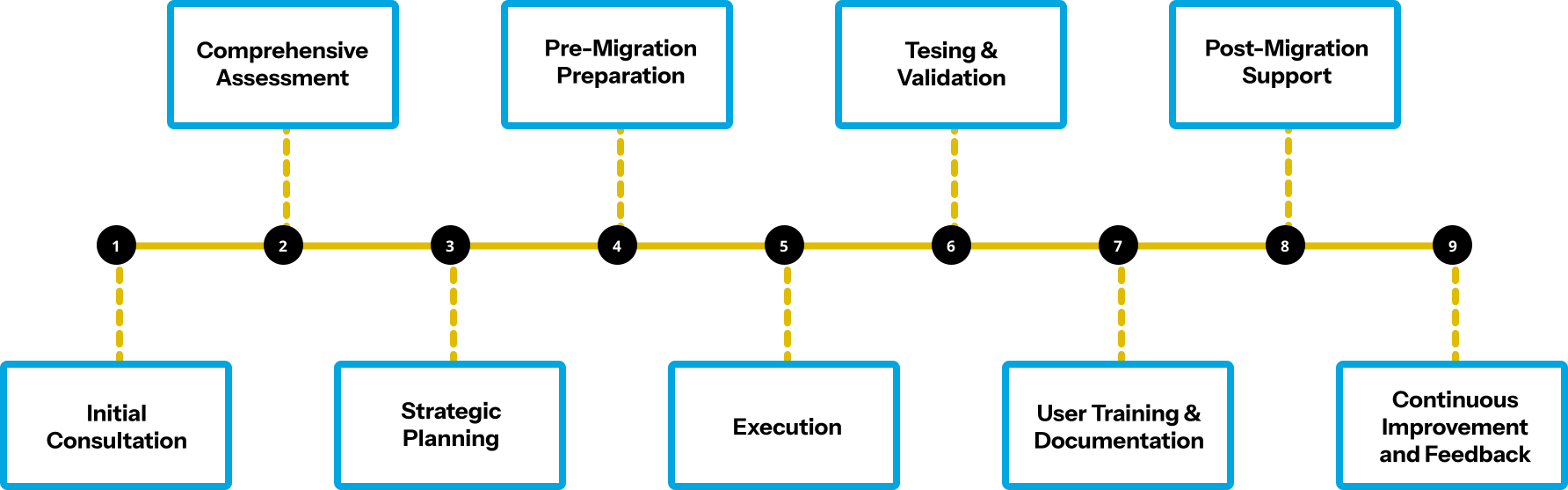
No honest duration exists without your data volumes. Microsoft says migrations are not covered by any service level agreement and that completion time depends on the number of users, their content and overall traffic.
Mailboxes usually set the schedule. ShareGate’s planning guidance puts one mailbox at about 1.5 GB per hour, with 16 mailboxes copied at once per machine. A worked illustration, not a client figure: 1,000 mailboxes averaging 10 GB is 10,000 GB. At 1.5 GB per hour and 16 in parallel, that is about 417 hours, roughly 17 days of continuous copying on one machine. This is why large moves copy data weeks ahead and keep the cutover to a short final pass.
The copy is rarely the longest part. Discovery, identity mapping, licence purchase, coexistence set-up, the pilot and user communication take planning time before the first batch.
| Option | Best for | Watch out for |
|---|---|---|
| Microsoft native tools (cross-tenant mailbox, OneDrive and SharePoint migration, Migration Orchestrator) | Teams that can run PowerShell and want content to stay inside Microsoft’s cloud | Per-user and per-100 GB licences. No delta passes for OneDrive and SharePoint. Teams channels not covered. |
| A third-party tool run by your team (for example ShareGate, BitTitan MigrationWiz, Quest On Demand Migration, AvePoint Fly, CodeTwo) | IT teams with migration experience and spare capacity | Tool licences on top. You still own identity mapping, coexistence and the domain cutover. |
| A Microsoft partner such as Krish | 500 or more users, a deal deadline, an Active Directory forest split, regulated data | Fees on top of licences. Ask for a published project with measured results. |
| Microsoft Consulting Services | Large enterprises with a Microsoft account team | Microsoft lists it as an option for complex moves; scope and price come from your account team. |
A small tenant with a few hundred users and no deadline can often run the native tools. A partner earns its fee when the move has a fixed date, several workloads, on-premises Active Directory or compliance rules.
Not sure which route fits your move? Talk to a Krish migration engineer.
A business unit split out of its parent’s tenant. A business unit of a global automotive enterprise, with close to 900 users, was tied to its parent’s Active Directory forest and Microsoft 365 tenant. Krish mapped dependencies, built a new domain and tenant, used ADMT with SID history and Azure AD Connect so users kept their access, piloted with AvePoint Fly, then moved users, devices, mail, files and Teams in phased batches with a final sync. The result: 100 percent data integrity and near-zero disruption. Read the case study.
Two acquisitions brought into one Microsoft 365 tenant. A US-based global FMCG and pet care company acquired two firms that ran on separate Google Workspace environments. Krish moved 300 users and nearly 14 TB of data into one Microsoft 365 tenant in phases, with data pre-staged ahead of cutover, and cut migration-related downtime by 90 percent. Read the case study.
Planning a merger or a split? Book a scoping call with Krish.
Get clarity on every stage of your tenant migration from data movement to post-migration support.
Not with Microsoft’s native cross-tenant tools: Microsoft does not support moves across clouds, such as from Office 365 Worldwide to a government cloud. These moves need a third-party tool and their own plan, which we scope separately.
We size migration licences before you buy them, remove inactive accounts and stale data before the copy, and plan the overlap so you pay for two tenants only as long as the move needs. After go-live we review licence assignments in the new tenant.
Users need normal Microsoft 365 licences in the target tenant. Microsoft’s native tools also need a Cross Tenant User Data Migration licence, a one-time fee per user, and SharePoint site moves need Cross-Tenant Shared Data Migration licences per 100 GB. Microsoft says migrations fail without them, so we confirm them with your Microsoft account team before the first batch.
Yes, we specialize in hybrid cloud solutions, ensuring seamless integration between your new tenant environment and any existing on-premises systems, enhancing overall operational efficiency.
Yes. We migrate collaboration data, including Teams, SharePoint, and OneDrive, with structure and permissions. Your files, chats, and access remain consistent. Users will not need to rebuild anything after migration is completed.
We copy data ahead of time, move users in batches outside business hours, and keep mail routing between the tenants until the last batch. Apps that use single sign-on are re-pointed to the new tenant in a tested order, so each app is down only for its planned switch.
It depends on user count, mailbox and file volumes, and how many workloads move. Copying is usually the shortest part; discovery, licences, coexistence set-up and the pilot take planning time first. We give a schedule after a scoping session.
Yes, but it can only be in one tenant at a time. The domain moves from the source to the target tenant in a planned cutover window, after the last mailbox batch.
Microsoft’s Migration Orchestrator moves Teams chats and meetings. Teams and channels are shared data and stay in the source tenant with Microsoft’s per-user tools, so they need a third-party tool or a rebuild.
Native tools work well for mailboxes and OneDrive when you can buy the migration licences and accept one-way moves. Third-party tools add Teams channel moves, re-runs before cutover and reporting. We recommend the mix that fits your data.
There is no fixed price. Cost depends on users, data volume, workloads, Microsoft migration licences, third-party tool licences and how long both tenants run side by side. Ask for a fixed-scope assessment before a full quote.
Get expert help for a clean and secure tenant migration. We make sure your data, users, and workflows stay intact throughout the move. Prefer to talk now? Call +1 (813) 784-0039.